Pages

Wednesday, May 19, 2010

Kitchen projects in Stitch

Nametag placemats

Check out the current issue of Quilting Arts Stitch for my pattern to make these nametag placemats, which of course double as placecards. I’ve been itching to make something like this for ages, so I was thrilled that Stitch liked them too.

Stepping Stones potholder

Also from the spring 2010 Stitch, my felt Stepping Stones potholder makes a quick hostess gift or spot of wall decor. Try cutting some of the circles from felt in houndstooth or another pattern!

Make sure not to miss my baby quilt or the other great projects in the magazine!

Friday, April 30, 2010

My EQ7 wishlist

2boxesHave you heard the news? The Electric Quilt Company is releasing the newest version of their quilt design software, EQ7, in June! The current version, EQ6, is the core of my design process, so I’m looking forward to seeing what extra goodies are packed into the update.

EQ is one of those pieces of software that the more you use it, the more you want to do with it. I’ve been using AutoHotkey to build some extra features into EQ6, expanding on my EQ6 Keyboard Shortcuts script. I just never got around to polishing the edges, fixing bugs, and posting the updated version here. Since it’s possible EQ7 will render parts of my script redundant (I hope!), there’s not much point updating it now. (I’ll put the alpha version up soon anyway if you’re interested.)

I mention it mainly ’cause it’s the basis for my EQ feature wishlist…so here are some of the things I’m dreaming of EQ7 doing (I’m not sure if these really are new features; I’m just hoping!):

  • Keyboard shortcuts. My script lets me access almost all of EQ’s tools from the keyboard, just like in a professional-grade graphics program, but it takes some kludges to work it.
  • Binding and backing calculations. EQ knows how big your quilt is, so why won’t it tell you how much binding or backing fabric you need? I programmed a binding calculator into the script that automatically calculates the yardage needed and the number of strips to cut based on the dimensions of your quilt. Here’s hoping EQ7 will save me programming the backing calculator!
  • Flexible irregular grid quilts. I’m getting better at using Custom Set layouts, but I’d love to be able to adjust the size of a block and have the software recognize that the surrounding blocks should be adjusted accordingly (instead of leaving a hole in the quilt). The press release says EQ7 will snap Custom Set blocks to their sizes from the Block Worktable, which should be a big help.
  • Rotary cutting for the whole quilt. Say your quilt is a Custom Set design with all different size blocks. Even if each is only a plain, unpieced block, you have to look up the dimensions of every individual block to see the cutting sizes. I’d love to be able to print the Rotary Cutting Chart for the whole quilt top and not just one block at a time—it’d be even handier if it could tally up the number of, say, red 2" squares scattered across multiple blocks.
  • Automated Fabric Library. I keep scanned and downloaded fabric swatches in a particular folder, and it’d be cool if EQ would scan that folder and automatically add the swatches to the Fabric Library. Not sure if EQ7 will do that, but the press release says we’ll be able to crop and edit fabric scans right in the program—no more stopping to fire up the photo editor. EQ7 has a new emphasis on photos, including an Image Worktable, so there should be some fun new tools to try out.
  • Large-scale fabric compatibility. EQ6 limits you to 200-pixel fabric tiles, which means prints with big motifs—like many current designer fabrics—don’t work well at all. I’d love to have an option to import larger tiles and set the scale, maybe with an on-screen ruler. It’d be great for trying out fussy-cut possibilities before chopping up real yardage.
  • Windows Explorer thumbnail previews. Rather than seeing a folder full of EQ logo icons, wouldn’t it be great to see previews of the first quilt in the files’ Sketchbooks? It’d be just like when you open a folder of photos and see the actual pictures instead of generic icons.

So that’s my EQ7 wishlist. I can’t wait to see all the tricks the new version has up its sleeve!

Thursday, April 22, 2010

Fabric options for Hilltop Drive quilt in Stitch

Have you seen the new Quilting Arts Stitch? I’m itching to get my copy and see all the projects they’ve packed into the spring issue. One of the projects I contributed was a baby quilt inspired by a fabulous Japanese import fabric printed with rolling country hills with cars, cows, and windmills (the top half of the quilt).

Hilltop Drive quilt

I’ve already had an e-mail from a reader of the magazine (hi Gwen!) asking what that fabric was. It’s from Kokka’s Trèfle collection, and I picked up my half yard from Hart’s Fabric in Santa Cruz (totally worth the drive from the Central Valley). They seem to still have it in stock for online orders if you’re interested in using the very same print. For a different project, I have the fabric in a different colorway that could also be fun in Hilltop Drive:

pink Trefle countryside

Since sending the quilt off to Stitch, I’ve been keeping my eye out for other landscape prints that could be used in the pattern. Hart’s has another pink Japanese import:
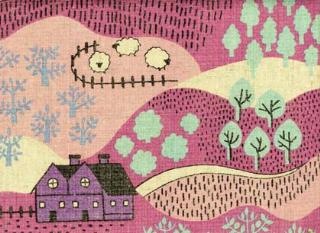
pink Japanese landscape print

Cute as they are, imported fabrics can get pricy (and hard to find), but American manufacturers have recently released a few prints that would work smashingly. I love this Willow Grove print from Alexander Henry, available in three colorways at eQuilter—ivory/lime, rose/turquoise, and my favorite, blush/honey:
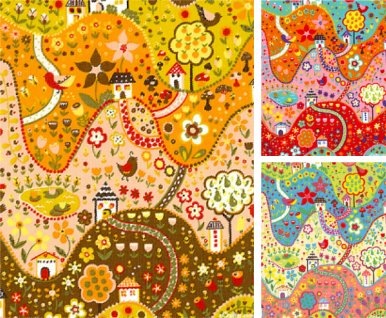
Willow Grove hills print

For a softer look, Chez Moi’s Hunky Dory has a hilly stripe print (in deep aqua, petal pink, light honey gold, and buttercream at eQuilter):

Hunky Dory meadow stripe

There’re also some nice grassy hills in Kate Honarvar’s Red Riding Hood line:

Red Riding Hood hills print

But who says you have to use hills at all? Anything that could represent sky would work nicely instead of the landscape—try fluffy clouds, or a print dotted with stars for a nighttime drive. Do share any clever ideas you have in the comments, and check out Stitch to get the pattern—then upload a photo of your own version to the Feed Dog Designs photo pool!

Tuesday, March 30, 2010

Rotary cutters quilt

rotary cutters quilt on my office wall

I made this quilt for a challenge at Queen B’s Quilt Shop. One of the fabrics we had to use was a black, white, and yellow floral; the other was a yellow dot. I’d been working on another quilt in these colors, which was the real reason I bought the challenge fabric. I had no idea what I was going to make for the challenge itself until I was cutting for the other quilt and set my rotary cutter down on the stack of fabrics. Lo and behold, it matched! Et voilà.

It’s back from the shop and up on the wall in my office now
(oh, and it was voted third place in the challenge!), setting the color scheme for the room.

Tuesday, February 23, 2010

Melinda Bula class

Summer Rose in progress

My quilt guild offered a workshop with Melinda Bula last week, and this is my version the Summer Rose pattern she taught (you can see her finished version in her shop) so far. I picked the dots mainly ’cause they were the only type of fabric I had several shades in, and I’m pretty happy with how the rose came out. Melinda was a great teacher—I learned a lot, and she kept us laughing all day. If you’ve got a chance to take a class with her, sign up! I’m loving her California School of Fuse.

I’m looking forward to trying out her quilting techniques when my machine comes back from the shop (please come home soon!), but first I have to get the leaves fused together. I’m just not sure what color to make them to work with the grey background. I’m not sure green would be right—what about brown?